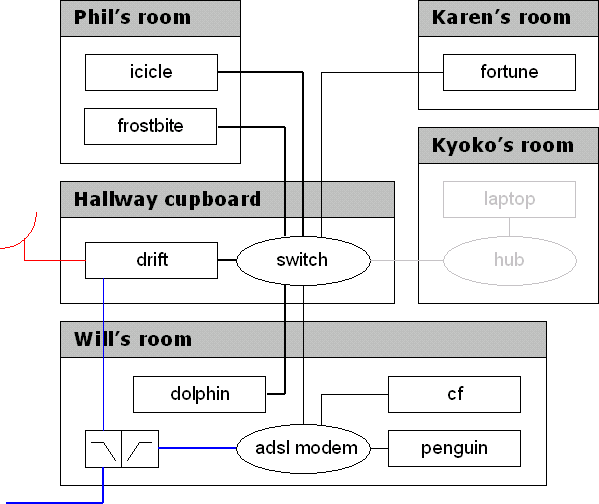
Key
The named black boxes are PCs
The thin black lines are 10BASE-T (10Mbps ethernet)
The thick black lines are 100BASE-T (100Mbps ethernet)
The thin blue lines are ordinary phone lines, also used for the modem
The thick blue lines are phone lines for ADSL
The two objects connecting them are the lowpass/highpass splitter/combiners
The red line & dish is/are the terrestrial digital radio link
The gray lines & objects are not permanent yet.
Our network
Recently Phil bought a 10/100 8-port switch and we re-laid our network to take advantage. Phil and I have moved our main PCs onto 100BASE-T, and the remainder use 10BASE-T.The flat's normal, permanent internet connection is through the Nokia M1122 ADSL modem, which has a 4-port hub built in and does the NAT (masquerading).
We also have a 256kbps rate-limited IHUG Ultra terrestrial digital radio connection through a linux box (icicle), which uses a normal modem connection on my phone line (the flat phone line is not shown). We only bring that up as needed, since it uses the phone line. It's mostly used for big downloads, which are too expensive to do on Telecom's ADSL pricing (about $0.14/mb on the 3GB plan).
??