In this story
Not all two-factor authentication is equally strong. The best options protect an account even against phishing, while several common methods can be defeated by a fake login page that relays your code in real time.
What Counts as Phishing-Resistant
The US National Institute of Standards and Technology (NIST) treats one-time codes sent by text or email, and push approvals, as vulnerable to real-time phishing: a fake site can pass your code or your approval straight to the real one.
Phishing-resistant methods work differently. Hardware security keys and passkeys use the FIDO2/WebAuthn standard: the key or device signs a challenge that is tied to the real website's address, so a lookalike site cannot use it. NIST's current digital identity guidelines (SP 800-63-4) accept syncable passkeys as well as hardware keys, and the US Cybersecurity and Infrastructure Security Agency (CISA) recommends FIDO-based methods as the phishing-resistant option.
SMS Codes: Familiar, but Restricted
SMS codes are the most common second factor, and the weakest. NIST's 2016 draft guidance proposed deprecating them; the final version kept SMS as a restricted authenticator that services may use only with extra safeguards. The risks are SIM swap fraud, where a scammer moves your number to their own SIM, and phishing pages that simply ask for the code.
Authenticator Apps and Push Approvals
Authenticator apps such as Google Authenticator and Microsoft Authenticator either show a six-digit code that changes every 30 seconds (TOTP) or send a push notification asking you to approve a sign-in. Both are stronger than SMS because they do not depend on your phone number.
They are still not phishing-resistant. A fake login page can ask for your app code and use it within the 30 seconds, and CISA groups app codes and push approvals together as phishable.
Push approvals have an extra weakness: attackers who already have your password can send prompt after prompt until a tired user taps Approve. Number matching, where you type the number shown on the login screen into the app, makes this much harder, but it is not the same as phishing resistance.
Security Keys and Passkeys
Security keys and passkeys avoid both problems because there is no code to hand over: the website checks a cryptographic signature from your device, and that signature only works on the site it was created for.
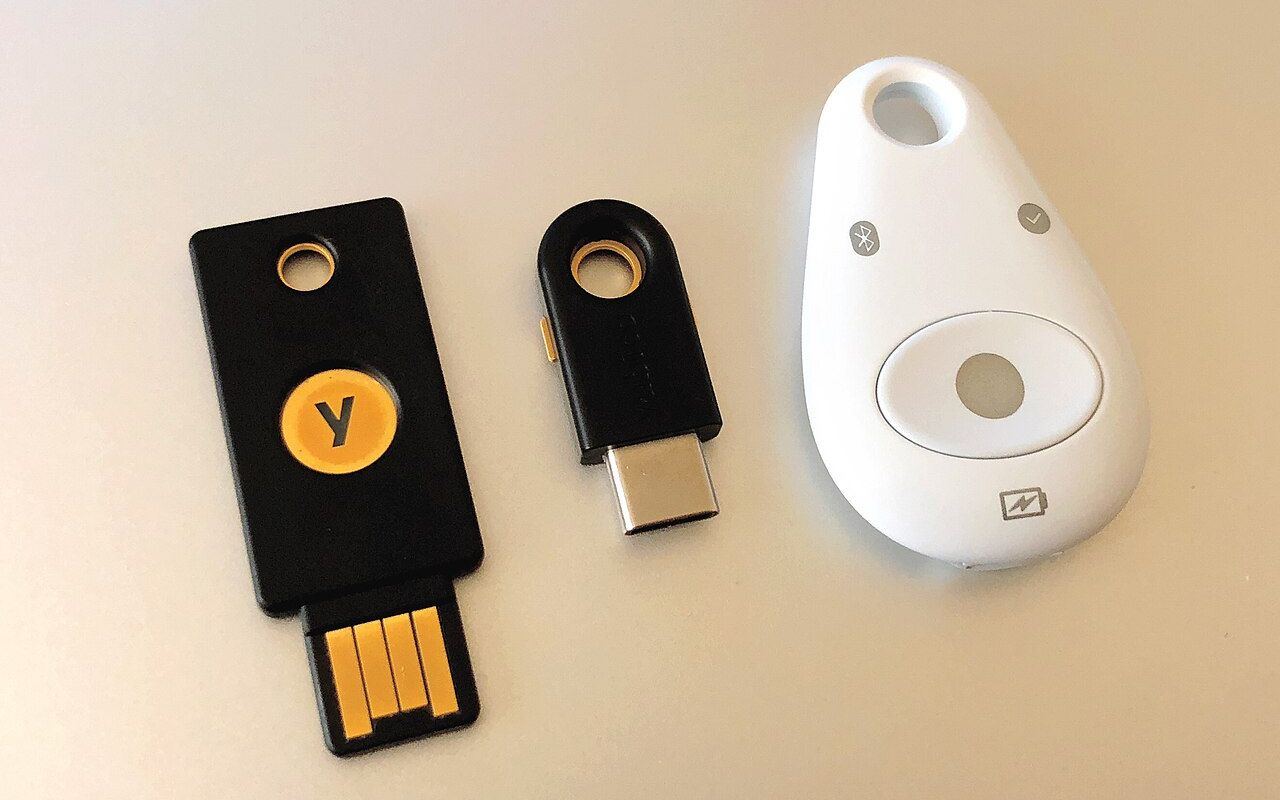
A hardware security key is a small USB or NFC device you keep with you. A passkey does the same job using your phone or computer, unlocked with your fingerprint, face or PIN, and it can be synced across your devices through your Apple, Google or Microsoft account.
Day to day they feel similar: you tap the key or unlock your phone instead of typing a code. The difference is recovery and portability. A hardware key is a separate object you can lose, so you need a second key or another backup; a synced passkey survives a lost phone as long as you can still sign in to the account that syncs it.
Recovery and Account Choice
Not every service offers passkeys or security keys yet, although Microsoft, Google and Apple all support them and more banks and shops are adding them. Where the only options are SMS or an app, choose the app.
Recovery is where many people get locked out. Before relying on a single key or phone, register a second key or passkey, save the recovery codes the service gives you somewhere safe, and keep your recovery email and phone number up to date. SMS is still widely used for account recovery, which is one reason to protect your mobile account with a PIN at your provider.
What the Standards Say, and What They Do Not
As a rule of thumb: use a passkey or security key for your email, your Apple, Google or Microsoft account and your password manager; use an authenticator app where passkeys are not offered; and treat SMS codes as the minimum, not the goal.
Your bank decides which methods it offers, so check its security settings and turn on the strongest option available.
- csrc.nist.gov/csrc/media/Presentations/2022/multi-factor-authentication-and-sp-800-63-digi
- pages.nist.gov/800-63-3-sp800-63b/sp800-63b.html
- secra.es/en/blog/phishing-resistant-mfa
- nist.gov/itl/applied-cybersecurity/special-publication-800-63
- nist.gov/blogs/cybersecurity-insights/announcing-draft-special-publication-800-63-3-digita
- nvlpubs.nist.gov/nistpubs/specialpublications/nist.sp.800-63b.pdf
- pages.nist.gov/800-63-FAQ/
- pages.nist.gov/800-63-3-sp800-63b/
- pages.nist.gov/800-63-4/